RESEARCH
AUReM: Auditing LLM-Generated Real Estate Models Systematically at the Formula Level
Introducing Apers Universal Real Estate Model Evaluation Framework (AUReM)
We're releasing AUReM Eval, the Apers Universal Real Estate Model evaluation framework — a system that audits institutional real estate financial models for mathematical integrity, check by check, cell by cell, across 12 evaluation categories and 99 individual tests.
[The Github repo can be accessed here]
The Problem with Spreadsheet Trust
A single institutional acquisition model for a multi-tenant commercial property might span 20 to 40 interconnected worksheets. It tracks hundreds of lease terms, layers multiple debt tranches with distinct payment priorities, computes levered and unlevered returns at both the asset and partnership level, and runs sensitivity across rent growth, cap rate, and financing assumptions simultaneously. Shift the exit cap rate by 50 basis points and the effect propagates through cash flow projections, debt coverage ratios, waterfall distributions, and return metrics in ways that are difficult to verify by hand.
These models drive nine-figure capital allocation decisions. And yet verification today is manual, inconsistent, and overwhelmingly focused on the wrong thing. Most model review processes conflate two distinct questions: are the assumptions reasonable, and are the formulas correct? The first is an investment judgment call. The second is a math problem. We built AUReM to answer the second one definitively.
Where Existing Approaches Break Down
Ask an analyst to "check the model" and they will typically scan the assumptions page, eyeball a few key outputs, and maybe trace one formula chain. This catches obvious errors — a rent that's clearly too high, an IRR that doesn't feel right — but it misses the structural failures that matter most.
Consider three specific failure modes. A management fee calculated on gross potential rent instead of effective gross income — wrong base, wrong number, and the error compounds every year of the hold period. A balloon payment that's hardcoded rather than derived from the amortization schedule, so the model silently breaks when someone changes the interest rate. An exit capitalization using trailing-year NOI instead of the forward year, mispricing the asset at sale by whatever the growth rate is worth over a full year of income.
These are not edge cases. They are among the most common errors in production real estate models, and they share a property: each one is invisible to anyone who reviews the model by looking at outputs rather than tracing formulas.
What AUReM Does
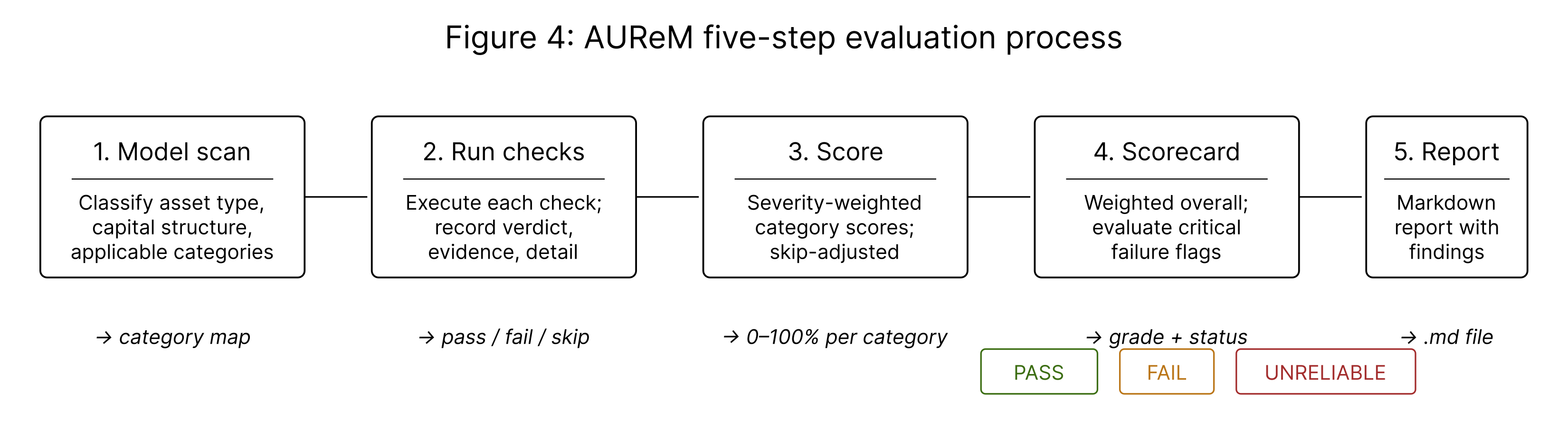
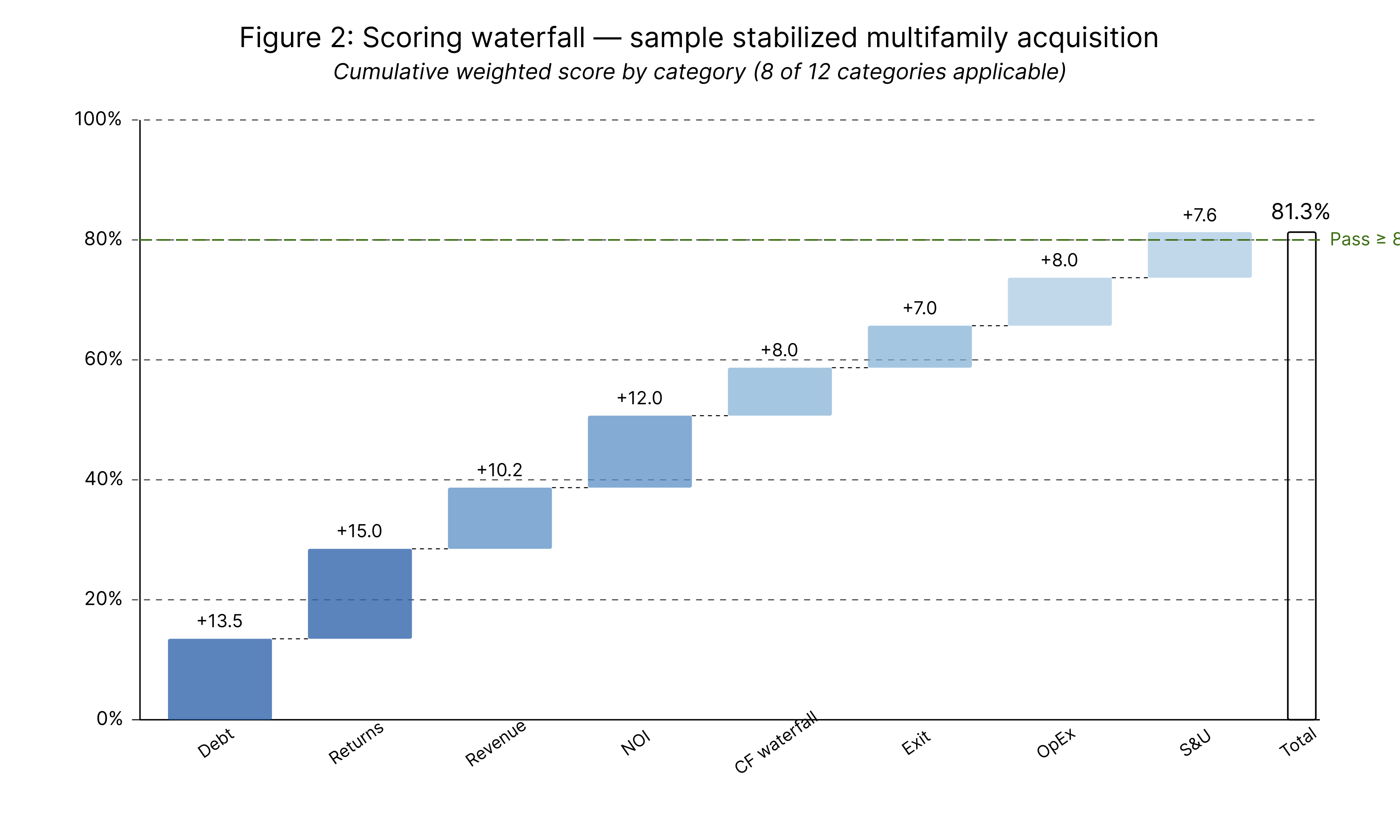
The evaluation runs in five steps. First, a structural scan classifies the model — asset type, hold period, capital structure, partnership structure, lease structure — and determines which of 12 categories apply. A stabilized multifamily acquisition with a single loan might activate 7 or 8 categories. A ground-up office development with mezzanine debt and a GP/LP waterfall activates nearly all 12.
Second, every applicable check runs. Each check produces a verdict (pass, fail, or skip), the specific cells and formulas examined, and what was expected versus what was found. The evaluator traces math cell by cell. Assuming correctness is not permitted.
The 12 categories cover the full anatomy of a real estate model:
Revenue Build-Up traces the path from physical assets to effective gross income — base rent arithmetic, vacancy and credit loss deductions, compound rent escalations, and the final EGI rollup.
Operating Expenses verifies line-item sums, per-category compound escalation, management fee base (EGI, not GPR or NOI), reassessment rules, and above-line / below-line classification.
Net Operating Income confirms the core identity: NOI = EGI − Total Operating Expenses, and that no depreciation or mortgage interest has leaked above the line.
Capital Expenditures verifies that CapEx sits below NOI, reserves are sized and escalated, tenant improvements tie to lease events rather than being spread evenly, and the unlevered cash flow identity holds.
Debt Mechanics is the most detailed category, with 13 individual checks covering monthly rate derivation, balance continuity period by period, PMT formula inputs, IO-to-amortizing transitions, balloon payments, floating rate mechanics, construction draws, and covenant tests.
Cash Flow Waterfall verifies the cascade from NOI through CapEx and debt service into levered cash flow, confirming the exit year correctly combines operating cash flow with net sale proceeds.
Exit / Reversion checks sale price calculation, disposition costs, loan payoff, and net proceeds. The first check targets "the single most common error in real estate models: using trailing NOI rather than forward NOI" for capitalization.
Returns Metrics independently recomputes IRR from the stated cash flow stream, distinguishes levered from unlevered returns, and verifies equity multiple arithmetic.
Sources & Uses confirms the capital stack balances to zero and cross-checks the equity figure against the IRR's Period 0 and the loan amount against the amortization schedule.
Partnership / Waterfall Distribution verifies preferred return accrual, unreturned capital tracking, distribution hierarchy mechanics, marginal promote tier application, and the balance check that LP + GP distributions equal total distributable cash every period.
Lease-Level Revenue covers commercial tenant-by-tenant modeling — base rent, escalations, free rent, renewal probability, downtime, percentage rent, and reconciliation to the property-level revenue line.
Development / Construction verifies budgets, draw schedules, construction interest capitalization on drawn balances, contingency sizing, absorption, stabilization, and permanent loan conversion.
Why Severity-Weighted Scoring
Not every error carries the same consequence. AUReM assigns three severity tiers — Critical (3 points), Major (2 points), Minor (1 point) — and each check carries one of these weights. A wrong IRR and a missing WALT calculation both register as failures, but the scoring reflects that one of them corrupts the investment decision while the other is cosmetic.
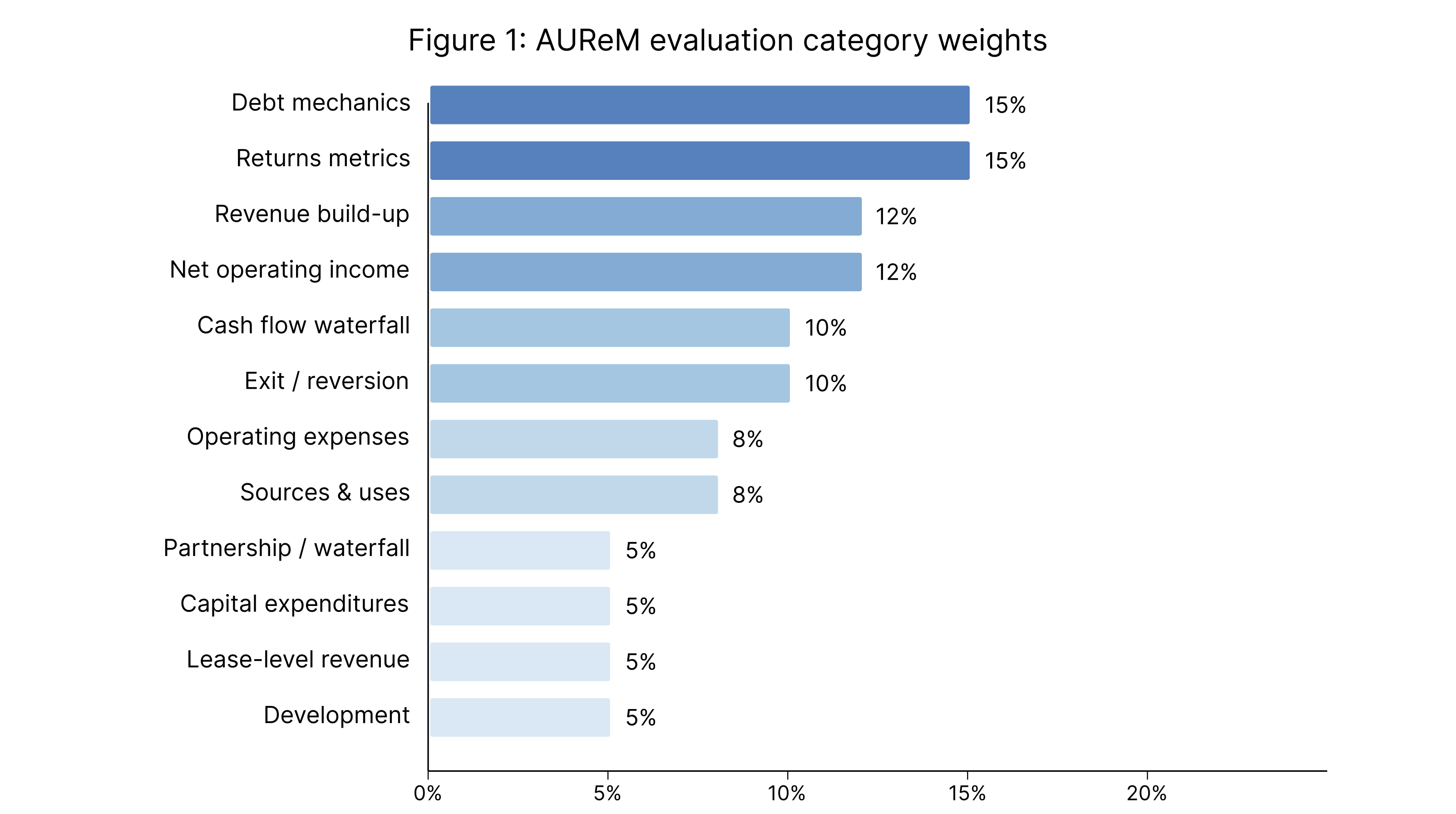
Category scores combine into an overall score using fixed weights that reflect downstream impact. Debt Mechanics and Returns Metrics each carry 15% because errors there directly corrupt what the investor sees. Revenue and NOI each carry 12% because they feed every downstream calculation. The remaining categories are weighted by typical impact on final outputs.
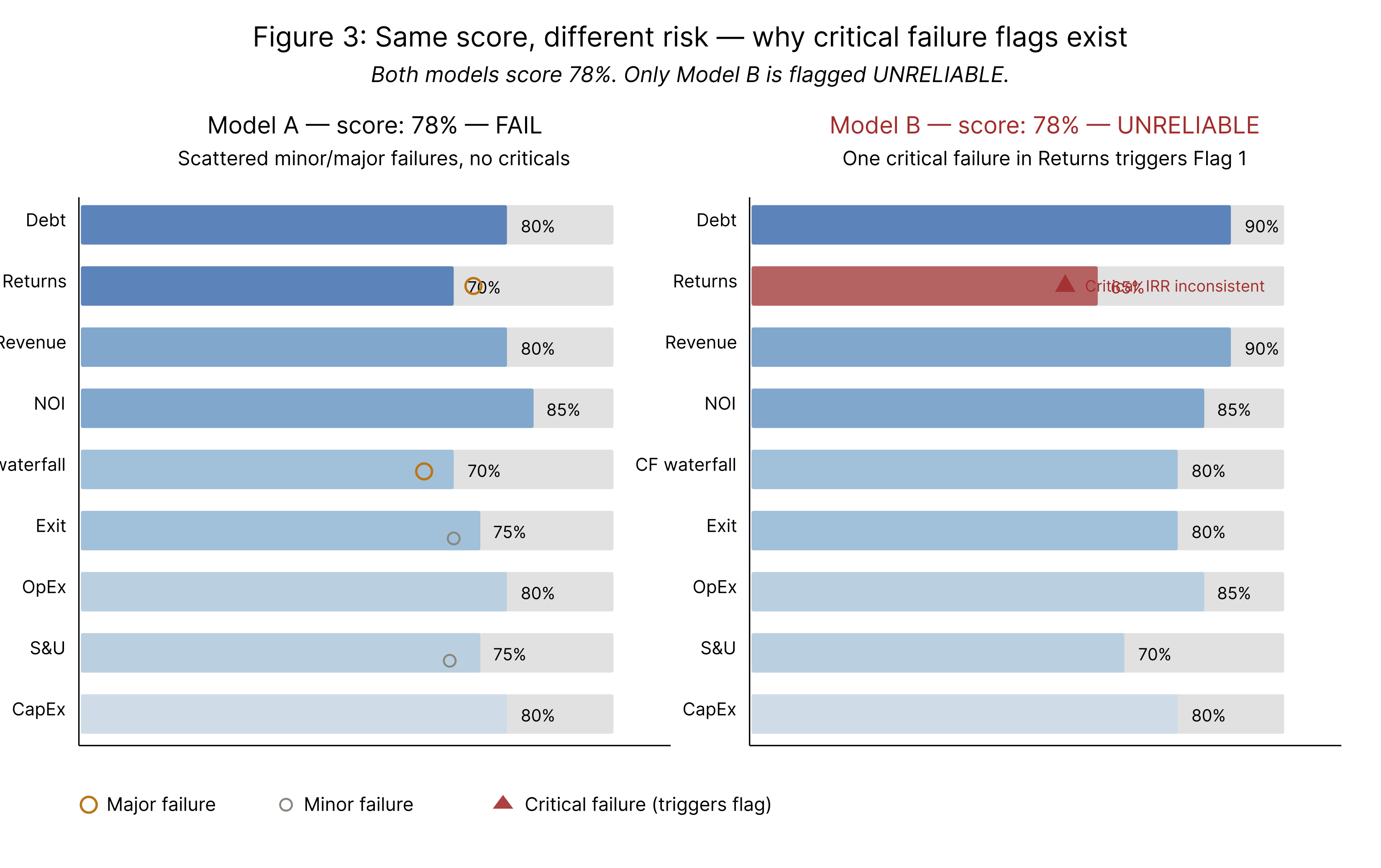
But weighted scoring has a known weakness: it averages. A model can score 75% overall while containing a single catastrophic error buried in a high-scoring category. So we added four critical failure flags that trigger an automatic UNRELIABLE designation regardless of numeric score. Any critical-severity failure in Debt, Returns, or NOI. Three or more critical failures anywhere. Any category scoring 0%. A stated IRR that is mathematically inconsistent with the cash flow stream. An UNRELIABLE model still receives its full score and detailed findings. The flag means: do not quote any number from this model in a memo, presentation, or loan application until the flagged errors are fixed.
Design Choices
We chose to evaluate math, not assumptions. A model with 0% vacancy and 10% annual rent growth will pass every formula check if those assumptions flow through the model correctly. This is a deliberate scope decision: assumption review requires investment judgment and market context that varies by deal. Formula verification does not. Separating the two makes the framework applicable across asset types, markets, and investment strategies without requiring domain-specific calibration of what constitutes a "reasonable" assumption.
We chose hard tolerances over judgment-based ranges. Each check specifies a numeric threshold — ±$1 for loan balances, ±0.5% for IRR recomputation, ±50% of benchmark for reserve sizing. A value outside tolerance is a fail regardless of proximity. The tolerances are calibrated to what "correct" means in each context: structural identities should be exact, judgment-based items get wider bands.
We chose category-by-category evaluation over a single monolithic pass. Each of the 12 category files is self-contained and loaded one at a time. This keeps the evaluator focused and prevents information overload — a real concern when a complex development model might require 80+ individual checks.
We chose to make skipped checks invisible to scoring. When a category doesn't apply — no partnership structure means no waterfall checks — the weight redistributes proportionally across applicable categories. This prevents asset types with many inapplicable checks from being penalized or inflated by absent features.
Limitations
AUReM is specific to real estate financial models. The 12-category structure, the severity calibrations, and the tolerance thresholds all assume CRE model conventions. Extending to adjacent domains — infrastructure project finance, private credit facilities, fund-of-funds models — would require new category definitions and recalibrated tolerances.
AUReM does not evaluate circular references or solver-dependent cells. Models that use iterative calculation (common in construction loan interest capitalization) may produce correct outputs that the framework cannot verify without running the solver, which is outside its current scope.
Non-standard model structures require manual terminology mapping. The framework handles this through documented adaptation rules, but a model that deviates significantly from conventional CRE layout — a cryptocurrency-denominated rent structure, for instance — may have components that fall outside all 12 categories.
What Comes Next
The evaluation framework is one component of a broader system. We think the approach underlying AUReM — decomposing a complex structured artifact into independently verifiable categories, assigning severity-weighted checks with hard tolerances, and scoring with both numeric averages and categorical failure flags — applies beyond real estate to any domain where structured computation carries financial consequence.
The technical guide formalizes the evaluation process, documents every check, and provides the scoring methodology. AUReM is released under the Creative Commons Attribution-ShareAlike 4.0 license (CC BY-SA), allowing anyone to use, study, and adapt the framework, provided that proper attribution is given and derivative works remain openly shared under the same terms, in support of a more transparent and collaborative standard for real estate investment analysis.