The Pipeline Problem
Screening a pipeline of commercial real estate deals in one sitting is a different discipline from single-deal triage. A wholesaler drops forty off-market deals in your inbox on Monday morning. Each teaser has price, NOI, unit count, and a couple of sentences about the business plan. You have the rest of the day to tell your principal which ten are worth spending real time on. A per-deal screener at twenty minutes each is thirteen and a half hours of work. You do not have thirteen and a half hours.
The problem is not a lack of good screeners. The problem is that single-deal screening is the wrong mode for a batch of forty. What a pipeline scan needs is a different discipline: one workbook, forty deal rows, standardized assumptions applied consistently, sortable output. Every deal ranked against every other deal on the same basis, in the same sitting.
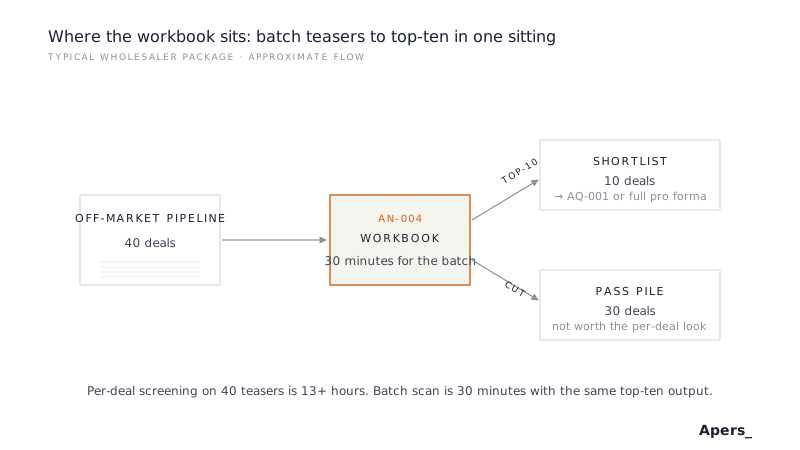
This article walks through the framework a batch screener has to implement, then shows how AN-004, the Apers open bulk screening workbook, runs it on a single horizontal sheet.
Batch Triage Is a Different Mode
The single-deal screener answers a specific question: is this one deal worth a full underwrite. The batch screener answers a different question: given a pipeline of N deals, which subset of K deserves that treatment. Different question, different discipline.
The critical distinction is that ranking is only useful if it is apples-to-apples. If deal A is scored on the broker's rent estimate and deal B is scored on your desk's more conservative estimate, the ranking is noise. If deal A gets a five-year hold and deal B gets a ten-year hold, the IRRs are not comparable. A batch screener enforces consistency by design: the assumptions that vary across the pipeline are the deal inputs (price, NOI, unit count). The assumptions that stay constant are the underwriting parameters (debt terms, exit cap spread, rent growth, hold period).
A per-deal screener like AQ-001 gives the reviewer freedom to override defaults for each specific deal. A batch screener like AN-004 takes that freedom away, on purpose. That is the tradeoff that makes the batch output legible.
What the Sheet Asks for Each Deal
A well-formed batch teaser package supplies a small, uniform set of inputs per deal. Anything more and the batch mode collapses (you cannot fill a hundred cells per row for forty deals in one sitting). Anything less and the ranking becomes uninformative.
- Deal identifier and address. The reviewer needs to know which row is which deal when the top-ten shortlist gets sent to the principal.
- Purchase price and units or square feet. The denominator for every per-basis metric.
- Current NOI. Trailing-twelve is fine; the ranking exists at the pipeline-scan tier, not the diligence tier.
- Basic capex estimate. A single dollar figure per deal is enough. Detailed scope belongs downstream.
- Optional per-deal overrides. A small number of fields (e.g. market rent) can vary per deal if the batch is heterogeneous. Everything else stays constant.
Five to seven inputs per deal, times fifty deals, is a workable amount of typing for an analyst who knows the sheet. Ten inputs per deal is not. The batch screener's spec is defined by what a working reviewer can key in without breaking flow.
What Ranking Actually Means
Given the per-deal inputs and the batch-standardized assumptions, the workbook computes each deal's return metrics and produces a sortable list. Ranking is a two-step operation: filter, then sort.
The filter eliminates deals that fail structural gates. A deal with a DSCR below the lender's floor is a non-starter regardless of headline IRR. A deal with a going-in cap tighter than the debt rate (negative leverage) is another. Filtering happens first because deals that fail the gates are not comparable to deals that clear them.
The sort orders the surviving deals by whichever metric matters most for the current pipeline scan. For a value-add pipeline, that is usually levered IRR. For a core acquisition pipeline, it is often going-in cap. For a family-office pipeline focused on cash flow, Year-1 cash-on-cash. The batch screener supports all three sort keys because the same pipeline can be scanned through different lenses depending on the principal's mandate for the week.
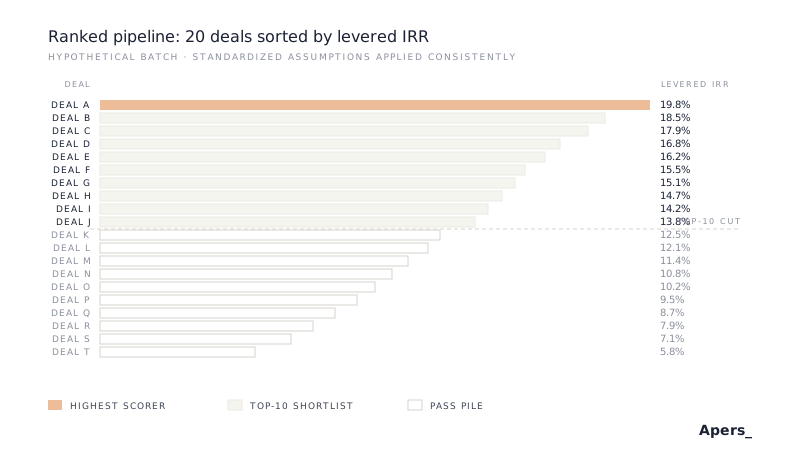
The top of the sorted list is the shortlist. Everything above the cut earns a per-deal look. Everything below the cut is the pass pile at this pipeline scan tier, unless the reviewer has a qualitative reason to promote a specific deal above its ranked position.
Where Standardized Assumptions Live
The batch workbook has a small block at the top of the sheet where the reviewer sets the assumptions that apply to every deal in the batch. Getting this block right is where the discipline lives.
The block typically includes debt terms (LTV, rate, amortization schedule), exit cap spread (basis points over going-in), rent growth per year, expense growth per year, and hold period. These are set once, at the start of the session, based on the current market and the desk's current mandate. Changing them mid-session invalidates every ranking that came before.
If the batch is heterogeneous enough that a single set of assumptions does not fit (a package of stabilized core deals mixed with value-add repositioning plays), split the batch and run two separate sessions. Trying to force one set of assumptions across strategies produces a ranking that ranks nothing.
How AN-004 Runs the Framework
AN-004 is the Apers open bulk screening workbook. A single horizontal sheet with a standardized-assumption block at the top, a deal input area sized for twenty to fifty rows, and a computed output panel to the right of each row. Filter gates, sort keys, and top-ten export are built into the output panel.
The workbook deliberately excludes per-deal customization beyond the small optional-override fields. There are no monthly cash flow tabs, no per-deal debt sizing worksheets, no waterfall structures. Adding any of them would make the workbook slower per deal (defeating the batch use case) and would tempt the reviewer to fine-tune assumptions per deal (defeating the apples-to-apples ranking).
The workbook is designed to be filled top-to-bottom in one uninterrupted session, not returned to over the course of a week. Batch scans are a mode, not a workspace. If you find yourself opening AN-004 across multiple days for the same pipeline, the batch has probably become a portfolio and belongs in a different tool.
From the Top Ten to Full Underwriting
The top-ten output of AN-004 is not a shortlist ready for investment committee. It is a shortlist ready for real per-deal screening. The natural next step is the single-deal screener, then the asset-specific pro forma:
- Per-deal screening: AQ-001 Quick Acquisition Screener
- Stabilized multifamily: AQ-111 Multifamily Core Pro Forma
- Value-add multifamily: AQ-131 Multifamily Value-Add Pro Forma
- Anchored retail: AQ-301 Anchored Retail Shopping Center
- Ground-up development: DV-001 Ground-Up Development
The handoff from AN-004 to AQ-001 preserves the per-deal inputs directly. The AQ-001 screener then permits per-deal assumption overrides that AN-004 deliberately withheld, and produces a sensitivity matrix and disqualifier flag set at the individual-deal level.
Related Models
AQ-001 Quick Acquisition Screener is the paired tool downstream. AN-004 gets you to the top-ten; AQ-001 confirms each of those ten deserves the full underwrite. The two workbooks share the same input vocabulary so the handoff is a copy-paste, not a re-key.
AQ-110 Multifamily Core/Core-Plus Pocket is the asset-specific per-deal screener for stabilized multifamily. When a multifamily-heavy batch pipeline survives AN-004, the top-ten graduate directly into AQ-110 for asset-specific triage before the full pro forma.